
How to Link Aadhaar with TNEB: Complete Guide for Tamil Nadu Electricity Bill Subsidies
In Tamil Nadu, the electricity subsidy system is undergoing a significant digital transformation. To ensure that government benefits reach the right households, TANGEDCO (Tamil Nadu Generation and Distribution Corporation) has made it essential for consumers to connect their identity records with their service numbers.
This guide provides a clear, step-by-step walkthrough on how to link your Aadhaar with your TNEB connection to secure your 100 free units and other benefits.
1. What is Aadhaar Linking for TNEB?
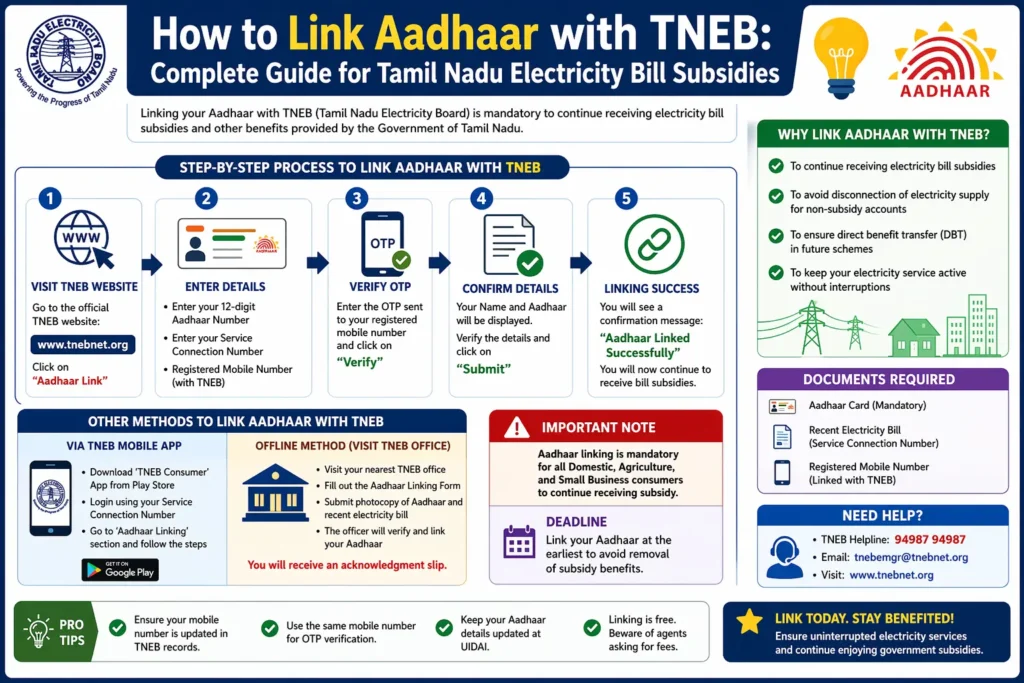
Aadhaar linking for TNEB is the process of mapping your 12-digit Unique Identification Number (UID) to your Electricity Service Connection Number.
The Tamil Nadu government requires this to streamline the distribution of electricity subsidies. By linking these accounts, the government can identify genuine domestic consumers, prevent the misuse of subsidies across multiple commercial or unauthorized properties, and maintain an updated database of service holders.
2. Benefits of Linking Aadhaar with TNEB
Linking your Aadhaar isn’t just a compliance task; it offers several direct advantages:
- Electricity Subsidy Eligibility: It is the primary requirement to continue receiving the first 100 units of electricity for free every two months.
- Government Scheme Benefits: Stay eligible for various state-sponsored welfare schemes related to power and housing.
- Avoid Service Interruptions: Unlinked accounts may face restrictions during online bill payments or name transfer requests in the future.
- Transparency: Reduces the chances of “ghost connections” and ensures your consumer profile is secure.
3. Documents Required for Aadhaar Linking
Before you start the process, keep the following items ready to ensure a smooth experience:
- Aadhaar Card Number: The 12-digit number of the person whose name is on the EB service connection.
- Electricity Service Number: You can find this on your previous white meter card or old payment receipts.
- Registered Mobile Number: The mobile phone linked to your Aadhaar card is required to receive the OTP (One-Time Password) for verification.
4. How to Link Aadhaar with TNEB (Step-by-Step)
Method 1: Online via TANGEDCO Portal (Easiest)
- Visit the official TANGEDCO Aadhaar Upload Portal.
- Enter your Service Connection Number (include your region code).
- Verify your mobile number via OTP.
- Enter the Aadhaar Number and the name as it appears on the card.
- Upload a clear photo or scanned copy of your Aadhaar card (if prompted, usually under 500KB).
- Submit the form. You will receive an acknowledgement number for tracking.
Method 2: Offline at EB Section Office
- Visit your local TNEB Section Office.
- Carry a photocopy of your Aadhaar card and your latest electricity bill.
- Fill out the simple Aadhaar linking form provided at the counter.
- The official will verify your documents and update the record in the system manually.
[!TIP]
Check your electricity bill calculation before linking Aadhaar to see how much you are currently saving with the 100-unit subsidy by visiting our guide on how to calculate electricity bill.
5. How to Verify Aadhaar Linking Status
If you aren’t sure whether your connection is already linked, follow these steps:
- Portal Check: Go to the TANGEDCO web portal and enter your service number in the “Aadhaar Status” section. If linked, it will display “Aadhaar linked successfully.”
- Payment Receipt: In some regions, the latest digital payment receipts now indicate if the Aadhaar has been mapped to the service number.
- SMS: TANGEDCO occasionally sends automated SMS updates to the registered mobile number regarding the status of the seeding process.
6. Common Issues & Fixes
- OTP Not Received: Ensure you are checking the mobile number registered with UIDAI. If the signal is weak, wait for 2 minutes before clicking “Resend OTP.”
- Aadhaar Mismatch: If the name on your EB bill is different from your Aadhaar (e.g., due to a deceased family member or property purchase), you may need to complete a Name Transfer first at the EB office.
- Server Issues: The portal faces high traffic during the last week of every month. Try completing the process during early morning or late night hours for faster load times.
7. TNEB Subsidy Details (IMPORTANT)
The Tamil Nadu government provides a significant “Telescopic Subsidy” to domestic consumers.
- Who gets it: Only domestic (Home) connections are eligible. Commercial and industrial connections are excluded.
- The 100-Unit Limit: Every household gets the first 100 units free every two months.
- Aadhaar Impact: Without a linked Aadhaar, TANGEDCO may categorize the connection as “Unverified,” which could lead to the removal of the 100 free units benefit.
To see exactly how these subsidies impact your final bill amount, you can calculate your exact TNEB electricity bill here.
8. FAQs (AEO Optimization)
Is Aadhaar mandatory for TNEB? Yes, for domestic consumers who wish to avail themselves of the 100 free units subsidy and other government benefits, linking Aadhaar is mandatory.
How to link Aadhaar to EB number? The fastest way is through the TANGEDCO official website by entering your service number, Aadhaar number, and verifying via OTP.
What happens if not linked? If not linked, you may lose the 100 free units subsidy, and you might face difficulties in transferring the name on the service connection or making online payments.
How to check status? You can check the status on the official TANGEDCO portal under the “Aadhaar Seeding Status” link by entering your service connection number.